Showing posts with label Junos. Show all posts

Saturday, August 24, 2013

Juniper Router architecture

Junos separated Routing and Forwarding plane

The M series Juniper routers are designed with separate route and forward architecture. This is a great design that can benefit some one in a production enviroment. The main bottleneck is the resource drain on the router and packet drops. With this design these errors are eliminated as they can be, forwarding plane will still forward packet despite the over utilized routing protocol operation. A logical diagram can clarify this architecture even more.
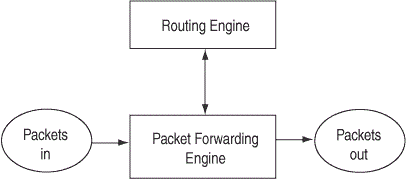

The routing engine is used to provide routing protocol service, similar to BGP, OSPF, RIP, IS-IS and other Layer3 traffic. Packets that are forwarded upon the routing protocol decisions are passed onto packet forwarding engine. The PFE engine caches the paeket flow and if no protocol control is needed it works independently of the RE. This is a good thing to know if some routing protocol fails we still have the basic packet flow.
To communicate PFE and RE use integrated links that can be controlled with firewall filters to drop the traffic that is not due to pass trough the link. This way the we prevent the over utilizing the router and freeing up some router resources with simple config scripts. Also the security is touched here, as the managament can be filtered through these links.
Control plane has a simple task of generating a routing table and creating the RIB (Routing information base) and FIB (Forwarding information base). Forwarding plane is responsible for simple packet forwarding. This packet forwarding is happening via hardware (ASIC). The path is from the ingress interface to the proper path selected egress interface.
This special infrastructure of the JunOS router has separated forwarding decisions from the MAIN cpu unit.This isolation of tasks no longer need help only from a single processor. This benefits network engineer in production environment. During the running time they can load new application modules without shutting down the router and no uptime is disrrupted. The JunOS introduces us with graceful restart capabilities.
The routing engine consists of:

  • Intel based PCI platform (CPU) that is running JunOS
  • SDRAM storage of the routing and forwarding tables 
  • Compact flash storage for platform images
  • Hard disk for a secondary storage
The Routing engine has a 100 Mbps link to the Forwarding engine. PFE has a design of Fabric switch implementation features. On the other hand JunOS has a very well designed virtuelized router implementations, that allows network engineers to have multiple instances of router inside a single hardware.

All together I will introduce more JunOS features in future blogs. 

Feel free to comment.

Thursday, August 22, 2013

Secure the Juniper router

Protect the Junos managament plane


Firewall filters have been a long time with networking people as must know command reference tools. Implementing the same firewall filters on JunOS networking operating system is to visualize and think about the fxp or the Loopback interface as the traffic control semaphor.


Interface loopback 0 is used in filtering any traffic that is destined and coming from the routing engine of the JunOS capable device. Everything is sent first to the Routing engine, and then it is evaluated by the firewall filters. Transit traffic is simply passed by the ASIC hardware.

So let's get on to it. First we should create a firewall policy.

[edit]
root@JunOS01# edit firewall family inet filter secure_RE

The we define the terms. I have used the 192.168.1.0/24 network simulated with a virtual box PC that will be used to test the managament on the JunOS device.

[edit firewall family inet filter secure_RE]
root@JunOS01# set term term_access from protocol tcp
root@JunOS01# set term term_access from port ssh
root@JunOS01# set term term_access from port telnet
root@JunOS01# set term term_access then accept

The term term_access is used to evaluate the 192.168.1.0/24 network and allow TCP protocol with telnet and ssh ports inside the router. I there very any other firewall filters they would be evaulated first if those filters were on the ingress interface.

[edit firewall family inet filter secure_RE]
root@JunOS01# set term denied_term from protocol tcp
root@JunOS01# set term denied_term from port ssh
root@JunOS01# set term denied_term from port telnet
root@JunOS01# set term denied_term then reject
root@JunOS01# set term DEFAULT then accept

Second term denied_term filters all other traffic with source IP addresses other than 192.168.1.0/24 and rejects it. And like in Cisco ACLs we should use the default term to allow any other traffic to the routing engine. If the last term is not implied then processes like BGP, OSPF, IS-IS, RIP would not pass. This could create a serious impact in a production network.

We now have to apply the the filter to the Loopback interface to take effect.

root@JunOS01# set interfaces lo0 unit 0 family inet filter input secure_RE

I have attached a virtual box PC to the simulation to test the remote managament after the final configs applied. The scripts look like this in the small GNS3 scenario.


interfaces {
    em0 {
        unit 0 {
            family inet {
                address 192.168.1.1/24;
            }
        }
    }
    lo0 {
        unit 0 {
            family inet {
                filter {
                    input secure_RE;
                }
                address 10.0.0.1/32;
            }
        }
    }
}
firewall {
    family inet {
        filter secure_RE {
            term term_access {
                from {
                    address {
                        192.168.1.0/24;
                    }
                    protocol tcp;
                    port [ ssh telnet ];
                }
                then accept;
            }
            term denied_term {
                from {
                    protocol tcp;
                    port [ ssh telnet ];
                }
                then {
                    reject;
                }
            }
            term DEFAULT {
                then accept;
            }
        }
    }

After testing the ping and telnet traffic we see that we can log on to the router and ping traffic is passing correctly from our desired subnet.
ping

telnet


To test the firewall filter I have configured another IP address to the managament interface of the Junos01 router with a subnet 172.16.1.1/24.

ping after address change

telnet

Finally we can see that we have achieved the desired security effect. Normal traffic like ICMP that is destined to the Routing engine passed to the router, but the telnet traffic we filtered and denied via firewall filters is denied at the port level. 

This is one of the basic methods one can protect a JunOS router. 
Several others follow.

Thanks.

Saturday, August 17, 2013

Junos eBGP basic

Simple basic Junos BGP configuration

As in the other networking vendor designs, Juniper has similar checklist in configuring basic eBGP:
  • You have to identify the AS to which each of the peering routers belongs. Every AS in the world is uniquely identified by an AS number.
  • You have to decide on a group for the peering session. BGP groups everything so that you can have logical sets of connections that all behave more or less the same way.
  • You must know the specific IP address of the interface to which you’re connecting. This address is the neighbor address, as it’s the neighboring interface with which you are peering.
In this simple scenario we are starting out with two AS numbers in our lab 100 and 200 with directly connected eBGP neighbors. The routers Junos01 and Junos02 have startup configs of the interface IP adresses and routes. 
Here is the basic diagram:


First we setup the interface IP addresses for both the routers so we can achieve connectivity.

< JUNOS01 >

interfaces {
    em0 {
        unit 0 {
            family inet {
                address 12.12.12.1/24;
            }
        }
    }
    em1 {
        unit 0 {
            family inet {
                address 111.111.111.111/24;
            }
        }
    }
    lo0 {
        unit 0 {
            family inet {
                address 1.1.1.1/24;
                address 11.11.11.11/24;
            }
        }
    }
}

< JUNOS02 >

interfaces {
    em0 {
        unit 0 {
            family inet {
                address 12.12.12.2/24;
            }
        }
    }
    em1 {
        unit 0 {
            family inet {
                address 222.222.222.222/24;
            }
        }
    }
    lo0 {
        unit 0 {
            family inet {
                address 2.2.2.2/24;
                address 22.22.22.22/24;
            }
        }
    }
}

After setting the IP addresses we define the Autonomous system and the Router ID number which will be used to recognize the routers in BGP update negotiation.

< JUNOS01 >
routing-options {
    router-id 1.1.1.1;
    autonomous-system 100;
}

< JUNOS02 >
routing-options {
    router-id 2.2.2.2;
    autonomous-system 200;
}

We use the IP addresses of the loopbacks as the router ID , for a natural reason of loopbacks being always active and in case of dropping the links we could achieve BGP reachability. 

Next step is setting the BGP external groups with the type option and defining the peer address.
As this sounds very simple we will complicate the basic eBGP setup with another simple policy that is exporting directly attached interfaces to the BGP updates. This is a common thing an eBGP scenarios which is helpful in providing the reachability of the next hop address.

< JUNOS01 >
protocols {
    bgp {
        export EXP_LOOP;
        group eBGP {
            type external;
            peer-as 200;
            neighbor 12.12.12.2;
        }
    }
}
policy-options {
    policy-statement EXP_LOOP {
        term T1 {
            from protocol direct;
            then accept;
        }
    }
}
< JUNOS02 >
protocols {
    bgp {
        export EXP_LOOPS;
        group eBGP {
            type external;
            peer-as 100;
            neighbor 12.12.12.1;
        }
    }
}
policy-options {
    policy-statement EXP_LOOPS {
        term T1 {
            from protocol direct;
            then accept;
        }
    }
}

In the eBGP group statement we define the group as external eBGP and the peer Autonomous system. Also we should not forget the neighbor IP address. 

One more thing to do is to log on to the Junos01 router and see if the eBGP session is active and if the neighbors are seeing each other.

root@JUNOS1# run show bgp neighbor
Peer: 12.12.12.2+52301 AS 200  Local: 12.12.12.1+179 AS 100
  Type: External    State: Established    Flags: <ImportEval Sync>
  Last State: OpenConfirm   Last Event: RecvKeepAlive
  Last Error: Cease
  Export: [ EXP_LOOP ]
  Options: <Preference PeerAS Refresh>
  Holdtime: 90 Preference: 170
  Number of flaps: 0
  Error: 'Cease' Sent: 1 Recv: 0
  Peer ID: 2.2.2.2          Local ID: 1.1.1.1          Active Holdtime: 90
  Keepalive Interval: 30         Peer index: 0
  BFD: disabled, down
  Local Interface: em0.0
  NLRI for restart configured on peer: inet-unicast
  NLRI advertised by peer: inet-unicast
  NLRI for this session: inet-unicast
  Peer supports Refresh capability (2)
  Restart time configured on the peer: 120
  Stale routes from peer are kept for: 300
  Restart time requested by this peer: 120
  NLRI that peer supports restart for: inet-unicast
  NLRI that restart is negotiated for: inet-unicast
  NLRI of received end-of-rib markers: inet-unicast
  NLRI of all end-of-rib markers sent: inet-unicast
  Peer supports 4 byte AS extension (peer-as 200)
  Peer does not support Addpath
  Table inet.0 Bit: 10000
    RIB State: BGP restart is complete
    Send state: in sync
    Active prefixes:              4
    Received prefixes:            5
    Accepted prefixes:            5
    Suppressed due to damping:    0
    Advertised prefixes:          4
  Last traffic (seconds): Received 13   Sent 15   Checked 44
  Input messages:  Total 23     Updates 2       Refreshes 0     Octets 525
  Output messages: Total 25     Updates 1       Refreshes 0     Octets 578
  Output Queue[0]: 0

The output of the show command tells us that the session is active and that the EXP_LOOPS policy is working fine. We are advertising loopback prefixes to our neighbors as we mentioned before.

Future Junos labs comming up.